
14 AI Tools You Can Still Use for Free in 2024: The Complete Guide
July 9, 2024
The AI wave has given rise to countless apps, and more and more people rely on AI for everything from work to school. But generative AI is expensive to run, and many popular apps no longer offer their services for free. Are you also wondering where you can still find free AI tools? This article rounds up 14 incredibly generous AI tools that are still free in 2024 and that we’ve tested ourselves!
From search-and-answer AI that gets you information, to design AI that produces professional images in no time, to personal learning AI that works like your own private tutor, every tool on this list is simple to use and can meet your personal, customized needs for free.
Table of Contents
- General-Purpose AI Chatbots
- Productivity and Organization AI Tools
- Image Editing and Design AI Tools
- Learning and Personal Growth AI Tools
General-Purpose AI Chatbots
🟡 MixerBox AI
Of all the great AI tools out there, MixerBox AI is our top pick, because its free version gives you access to every feature.
On top of the basics like AI Q&A, writing, analysis and summaries, the free version of MixerBox AI also includes features that usually sit behind a paywall, such as web browsing, AI image generation and custom AI.
MixerBox AI has long ranked near the top of Taiwan’s AI chatbot charts, and the team has kept refining it and shipping new features since launch, including the most advanced AI models, more than 20 plugins, custom AI and a fully Traditional Chinese interface. All of this has made this AI chatbot, built by a Taiwanese team, a long-time favorite among users in Taiwan. It holds ratings of 4.6 to 4.7 on both the iOS and Android app stores, and its user base worldwide has passed one million.
MixerBox AI is a general-purpose AI assistant with a wide range of uses. In a nutshell, here are its 6 key features:
1️⃣ Integrates several of the most advanced AI models, including ChatGPT
2️⃣ More than 20 plugins, including web browsing, AI image generation and PDF summaries
3️⃣ No download or sign-up needed, and it connects to Facebook and LINE so you can use it right inside your social apps
4️⃣ Built-in voice assistant for hands-free voice control
5️⃣ Custom chatbots
6️⃣ Fully Traditional Chinese interface
What’s more, MixerBox AI doesn’t track or collect any personal information about its users, and its “Tracking Protection” feature blocks trackers on major websites, cutting down on ads and pop-ups. That makes it a great fit for users who care about privacy and security.
It’s also worth mentioning that MixerBox AI is the only AI app that supports MixerBox Player features. Building on the MixerBox team’s popular MixerBox Player makes MixerBox AI feel more like a powerful, feature-rich SuperApp.
Learn more: MixerBox AI Chatbot: Free Download of the Latest 2024 Version and a Quick-Start Guide
Developer: MixerBox
Price: The free version includes every feature. Paid plans cost NT$60 to NT$310 per month.
🟡 ChatGPT
The flagship of general-purpose AI chatbots. ChatGPT understands and generates natural-language text, offering everything from everyday conversation and answering questions to writing code.
Since its launch, ChatGPT has gone through several major upgrades, from the original GPT-2 to GPT-3 and now GPT-4 (with the latest update being GPT-4o). Each generation has made significant strides in understanding and generating language.
The big innovation in the new GPT-4o model is multimodal input and output: it can take any combination of text, audio and images as input and produce any combination of text, audio and images as output, which opens up an even wider range of uses.
Developer: OpenAI
Price: The free version offers unlimited use of the base model, with limited use of the advanced GPT-4o model. The paid plan costs US$20 per month.
🟡 Microsoft Copilot
Developed by Microsoft, Copilot is part of the Microsoft 365 ecosystem and is built mainly into Microsoft 365 apps such as Word, Excel, PowerPoint, Outlook and Teams. It uses generative AI to help you with all kinds of everyday tasks, boosting your efficiency and creativity. For example, it can generate text and write or edit documents in Word, analyze data in Excel, manage work meetings in Teams, or draft emails in Outlook.
You can currently use the web version of Copilot for free through Microsoft’s Bing search engine. Its strengths include search and image generation, but it has fairly strict limits on how much text you can enter in each conversation.
Developer: Microsoft
Price: Bing.com offers a free web version of Copilot. The paid version is included in Microsoft 365 subscription plans and costs about US$30 per month.
🟡 Google Gemini
Google Gemini is an AI chatbot developed by Google. It has built-in web search and is multimodal, seamlessly combining and understanding text, code, images, video and audio. It’s also one of the few general-purpose chatbots that still offers its basic features for free with almost no limits.
One of Gemini’s strengths is that it ties into many products in the Google ecosystem, including Google Search and Photos, and it can be built into Google Workspace services with enterprise-grade security and privacy protections. The AI features in Google Search and Photos are currently available only in the US, with other countries expected to follow later this year.
That said, the Gemini app is currently available only on Android.
Developer: Google DeepMind
Price: Basic features are free. The premium version costs NT$650 per month.
Jensen Huang on Running and Succeeding as a Business in the AI Era
Productivity and Organization AI Tools
🟡 Perplexity AI
An AI search-and-answer tool designed for research, learning, analysis and more. Perplexity AI analyzes your question, combines it with real-time Google search, and pulls precise, context-aware information from multiple sources, helping you dig deep into a topic. It can answer specific questions, help you find information and refine your search results.
Unlike a traditional search engine, Perplexity AI automatically turns its search results into a summary, an article outline or longer-form content. It also lists its sources for every answer, so you can check that the information is accurate.
Developer: Perplexity
Price: The free version has a daily limit on conversations. The paid plan costs US$20 per month.
🟡 Tome AI
Tome AI is an artificial intelligence tool built for creating presentations. It combines powerful AI models such as ChatGPT and DALL-E 2 so you can quickly build visually appealing slide decks. Its key features include AI-generated content suggestions, AI content summaries, design suggestions for color schemes and layouts, and built-in interactive elements such as polls and quizzes.
Tome AI also integrates with a variety of platforms, including Figma, YouTube, Miro and Google Sheets, making it easy to show content from different sources right inside your presentation.
Developer: Magical Tome
Price: The free version gives you 500 credits. Tome Pro starts at US$8 per month.
🟡 Otter.ai
An AI-powered speech-to-text service that provides automated notes and real-time transcription for meetings and conversations. Its main features include live transcription of meetings, automatic summaries, action-item assignment and live captions during meetings. Otter.ai works across platforms, including iOS, Android and the web, and integrates with popular meeting tools such as Zoom, Google Meet and Microsoft Teams.
Developer: AISense
Price: The free version lets you transcribe 300 minutes per month. Paid plans start at US$16.99 per month.
🟡 ChatPDF
An AI tool designed for working with PDF files. Upload a PDF and ask questions in real time to get a summary or detailed answers about its contents. It can scan an entire PDF in seconds and help you quickly find the information you need, which makes it ideal for students, researchers and professionals.
Developer: ChatPDF.com
Price: The free version allows 2 PDF files per day. The paid plan costs US$6.99 per month.
Image Editing and Design AI Tools
🟡 Clipdrop
Want to remove an image background for free?
Want to erase an object from a picture?
Want to remove a person from a photo?
Clipdrop has you covered!
Clipdrop is an advanced image creation and editing platform built for creative designers and marketing teams. It lets you create new images, edit existing ones, and generate variations in different sizes, levels of detail and styles.
The product was originally founded by former Google employees Cyril Diagne, Damien Henry and Jonathan Blanchet and launched in 2020. In 2024, Jasper acquired Clipdrop from Stability AI, further strengthening its capabilities in multimodal marketing automation.
Clipdrop offers a range of powerful features that make it easy to create and edit high-quality images. Its main features include:
Background removal: Quickly remove the background of an image to make the subject stand out.
Background replacement: Not only remove the background, but replace it to create a different scene.
Object removal: Easily remove unwanted objects to keep your images clean and professional.
Image enhancement: Use AI to automatically improve image quality and detail, making photos sharper and more vivid

Developer: Jasper
Price: Basic features are free. Paid plans start at US$39.99 per year.
🟡 DreamStudio
DreamStudio is an AI image generation platform developed by Stability AI, essentially a commercial app built on the Stable Diffusion model. Its goal is to offer a user-friendly interface so that non-technical users can easily tap into the power of Stable Diffusion.
DreamStudio can generate highly customized images from text descriptions. Thanks to the flexibility and extensibility of its open-source foundation, it gives you fine control over many details of the AI generation process, such as image depth and composition, and it supports inpainting and outpainting.
Developer: Stability AI
Price: Sign up and get 25 free credits, enough to generate about 120 images. You can buy more credits as needed.
🟡 Freepik
Freepik is a well-known design resource platform founded back in 2010. By offering a huge library of high-quality, free image resources to designers and content creators, Freepik quickly grew into one of the world’s leading image resource platforms. In recent years, Freepik has also been actively adopting artificial intelligence to improve the platform’s features and user experience.
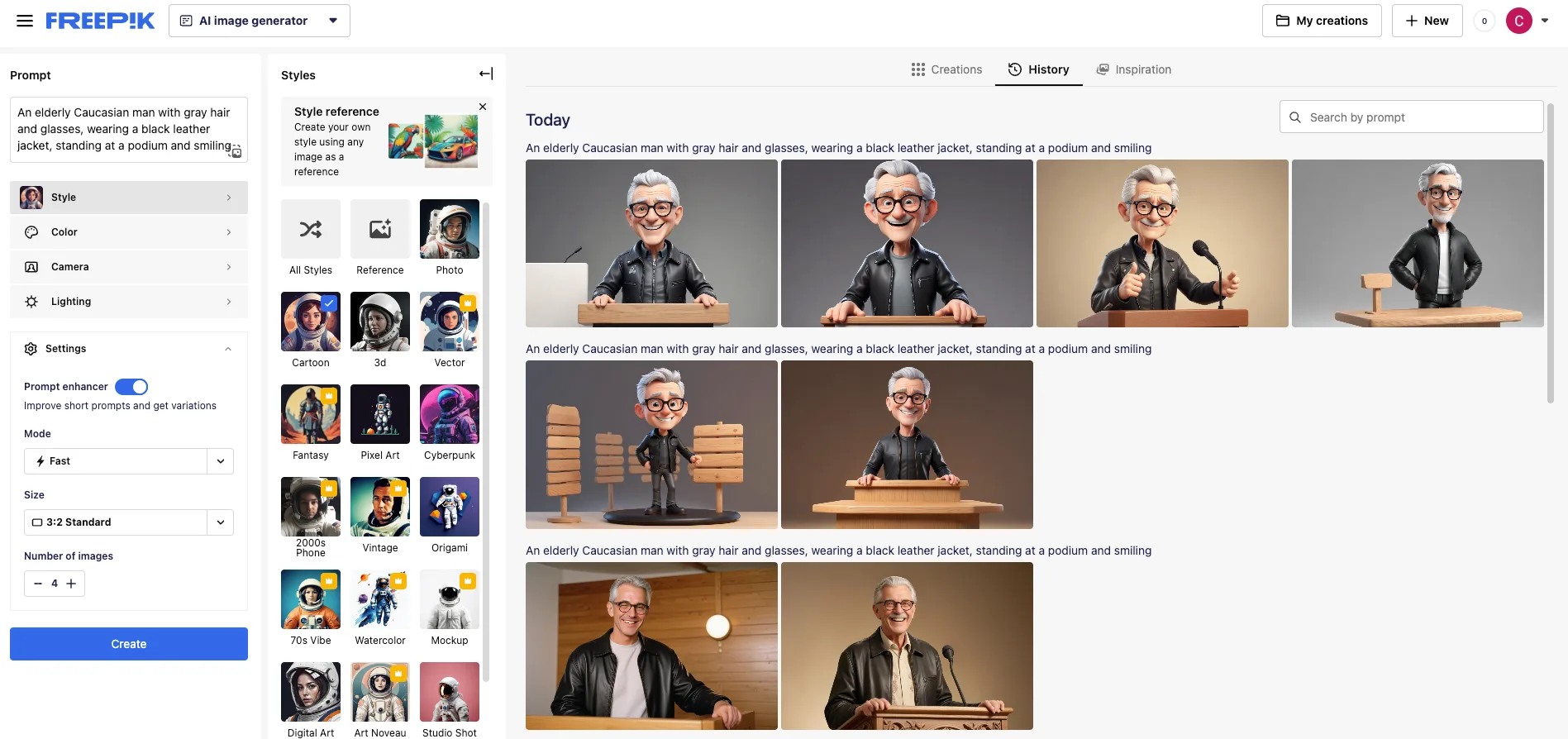
Freepik’s AI image generator is one of its headline features. Just type a simple description or prompt, and it generates high-quality, creative images. The tool supports a variety of styles, including realistic, retro and painterly, and you can adjust details like color, composition and lighting as needed.
In addition, Freepik’s “Reimagine” tool lets you upload an image and generate endless variations of it. This is especially handy if you need a variety of visuals, whether for social media posts, presentations or ad creatives. You can choose from multiple styles and adjust the level of detail to make sure the results fit your specific needs.
Freepik also offers Sketch to image, Image upscaler and many other features, giving you even more creative possibilities and making it easy for anyone to create professional-quality images.
Developer: Freepik Company
Price: The free version allows 20 images per day; the paid plan costs €15 per month
Learning and Personal Growth AI Tools
🟡 [**Duolingo
**](https://www.duolingo.com/)
Duolingo is one of the world’s largest language learning platforms. Since launching in 2012, it has racked up more than 800 million downloads and tens of millions of monthly active users. The latest version of Duolingo uses AI to analyze your progress and mistakes and personalize your learning path accordingly. It also includes AI features such as “Explain My Answer,” which helps you understand why your answer was right or wrong, and a role-play feature that simulates real-life conversations.
Developer: Duolingo
Price: The free version has limited features. The paid plan costs US$12.99 per month.
🟡 Grammarly
Grammarly is a powerful AI writing assistant. It uses advanced natural language processing and machine learning models to help you improve the quality of your writing. Grammarly doesn’t just check grammar, spelling and punctuation; it also offers style suggestions, tone adjustments and vocabulary improvements.
The latest version of Grammarly brings in generative AI to take its writing help even further. Basic features include grammar checks, spell checks and tone detection, while the paid version offers more advanced features such as sentence rewrites, style suggestions and citation checks.
Developer: Grammarly Inc
Price: Basic features are free. The paid plan costs US$30 per month.
🟡 Photomath
Photomath is an AI app built to solve math problems. Scan a math problem with your phone’s camera, and the AI recognizes and breaks down the problem, then shows you a detailed step-by-step solution. You can view the solution in several different ways and learn the math concepts step by step. It has passed 100 million downloads on Google’s Android platform and solves billions of problems every month!
Developer: Photomath
Price: The free version includes basic step-by-step explanations. The paid plan costs US$9.99 per month
👉👉 Further reading:
MixerBox AI Chatbot: Free Download of the Latest 2024 Version and a Quick-Start Guide
Make Your AI Chatbot More Accurate: 7 Practical Tips
Custom AI Now Free, and Your Favorite Commands Are Now Fully Customizable
4 Super-Useful AI Plugins That Dramatically Speed Up Your Workflow