
Make Your AI Chatbot More Accurate: 7 Practical Tips | MixerBox AI Newsletter
May 24, 2024
MixerBox AI Newsletter, Issue 004
Hi, MixerBox AI friends,
Thank you for choosing the MixerBox AI chatbot, built by a team in Taiwan. You’ve helped MixerBox AI pass one million users, and last week it once again made the Top 10 overall on Taiwan’s App Store and hit No. 2 on the Productivity chart!
We know that communicating effectively with AI sometimes takes a bit of experience and learning, but don’t worry: we’ve put it all together for you. Today we’re sharing some tips our development team has tested and proven, so your MB AI is no longer just a “bot” but more like your “reliable assistant.” Take the AI’s accuracy to a whole new level!
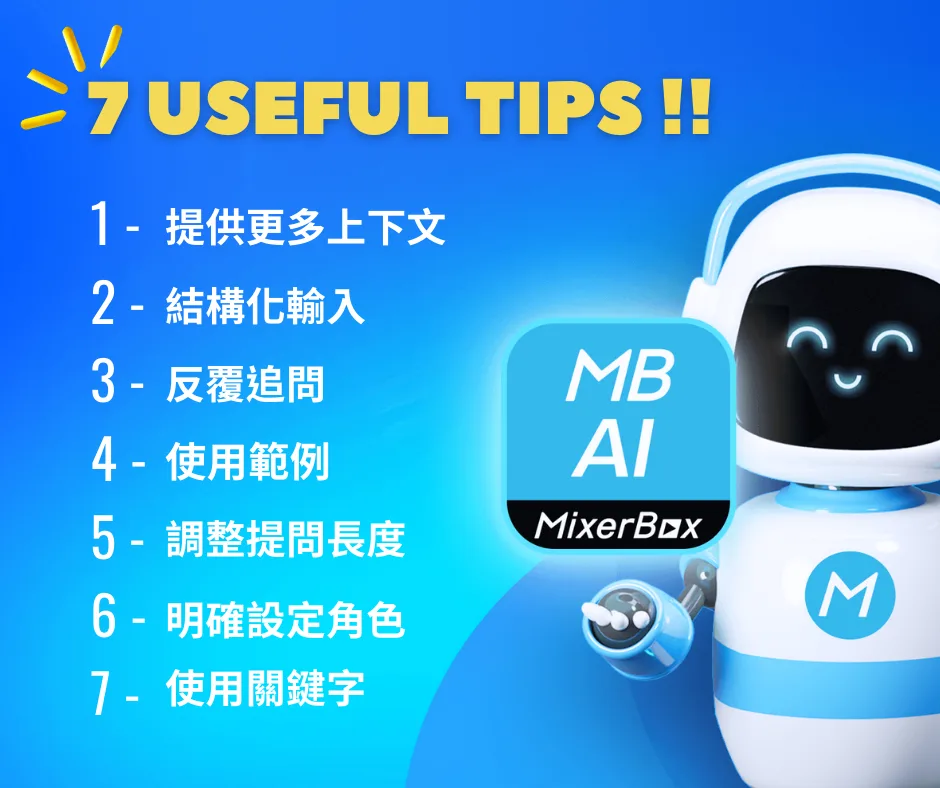
Make Your AI Chatbot More Accurate: 7 Tested, Proven Methods
-
Provide more context
Giving more context and background information when you interact with AI is the key to improving the accuracy of its responses. It helps the model understand the conversation and give more accurate answers. Context includes earlier questions in the conversation, the topic of the conversation, and specific situations or events.
For example: If you’re discussing a specific topic, such as “applications of artificial intelligence,” provide more background on that topic, like what you discussed earlier or relevant research findings. This helps the AI understand better and give more valuable responses. -
Use structured input
Try using structured input, such as a clear question format or examples, to help the AI understand what the task requires.
For example: If you need AI to help write a product description, try breaking down what you need into topic, purpose, audience, desired tone, product features and so on, and list them as bullet points in order. A structured input format makes the AI less likely to get confused or misunderstand. -
Keep asking follow-up questions
If the AI’s response isn’t accurate, try asking more follow-up questions to help it understand the context, which improves the accuracy of its answers.
For example: If the AI gives you an uncertain answer, you can ask additional questions to clarify, such as: “I’m not quite sure about your answer. Could you give me more relevant information?” or “Could you be more specific?” -
Use examples
If possible, give a few hypothetical examples to help the chatbot better understand the task and the response format you expect.
For example: If you want AI to write a piece of business copy, provide a sample email for the AI to use as a reference for structure and tone. If you want AI to recommend a martial arts novel, name a few actual novels you like. -
Adjust the length of your question
The length of your question has a big impact on the quality of the AI’s response. A question that’s too short may not give the AI enough context to understand it accurately. A prompt that’s too long may make it hard for the AI to focus, leading to off-topic answers. A moderate length helps the AI give more precise responses. But “moderate” isn’t about an exact word count; the point is to be precise and leave out less relevant information so the AI doesn’t get distracted.
For example: A good question should include the main question or task, the necessary background, and any important conditions or constraints. Something like: “Artificial intelligence refers to the ability of machines to simulate human intelligence. Please explain the concept of artificial intelligence and give examples of how it’s used in healthcare.” -
Clearly assign a role
Clearly assigning the AI a role helps it better understand its task and the situation in the conversation, so it can produce more suitable responses. A role can specify the tone, level of expertise and amount of detail the AI should use, which is especially important for getting accurate answers in specific situations.
For example: Set the AI’s role as “customer service” and ask: “As a customer service representative, please explain the features of product XX and tell me its main advantages.” -
Use keywords
Use keywords or technical terms in your prompts. These keywords can guide the AI’s generation process and help it produce more relevant responses.
For example: If you want the AI to give you a response about environmental protection, try to include some keywords in your prompt, such as: “Please give me some information about climate change and renewable energy.” These keywords help the AI understand what you need and generate relevant responses.

5 Silicon Valley Startup Trends for 2024
YC, the world’s top startup accelerator, based in Silicon Valley, shared the trends it observed among the 260 startups in its just-wrapped W24 batch. This year, 70% of founders chose to focus on AI, compared with just 8% four years ago. YC also summed up the 5 biggest startup trends of 2024.
👉👉 Read the details: 5 key things you need to know about putting AI to work
Thank you!
The MixerBox AI team, growing alongside you
👉 Try MixerBox AI: mixerbox.ai
👉 Want the latest MixerBox AI news? Follow the MixerBox Facebook page!
👉 MixerBox AI Chatbot: Free Download of the Latest 2024 Version and a Quick-Start Guide
👉👉 More popular articles:
4 Super-Useful AI Plugins That Dramatically Speed Up Your Workflow