
Major MixerBox AI Update: Custom AI Now Free, Set Your Own Frequently Used Commands, and More New Features to Explore! | MixerBox AI Newsletter
March 18, 2024
MixerBox AI Newsletter, Issue 001
Hi, MixerBox AI friends,
Over the past few weeks, we’ve rolled out some major updates to MixerBox AI, and we wanted to tell you about them right away:
-
**We’ve launched custom AI!
**MixerBox AI has launched custom AI bots, and free users can try them too! No coding required: just tell MixerBox AI what you need in everyday language, and it will create a bot just for you.
MixerBox CustomAI can carry out all kinds of tasks more closely in line with the needs you set in advance. Head to “Create Custom AI” in the left-hand menu to discover what custom AI can do for you. Or pick from some of the most popular publicly shared AIs on last week’s custom AI leaderboard. -
**How to use AI to handle the English you need at work
**The MixerBox AI team has noticed that translation between all sorts of languages is one of the most common reasons people use AI. We’ve rounded up a set of the most frequently used tools — here’s your list.- If you often need to write emails or messages in English or join international online meetings at work, save 👉
Workplace English Grammar AI Helper - If you often spend a lot of time creating English marketing content, whether for Instagram, Facebook or Twitter, save 👉 3-Minute Social Marketing Mate
- If you often need to write English marketing copy but struggle to keep up with the hottest keywords of the moment, save 👉
English SEO Expert
- If you often need to write emails or messages in English or join international online meetings at work, save 👉
-
**MixerBox AI now lets you set your own “Frequently Used Commands”
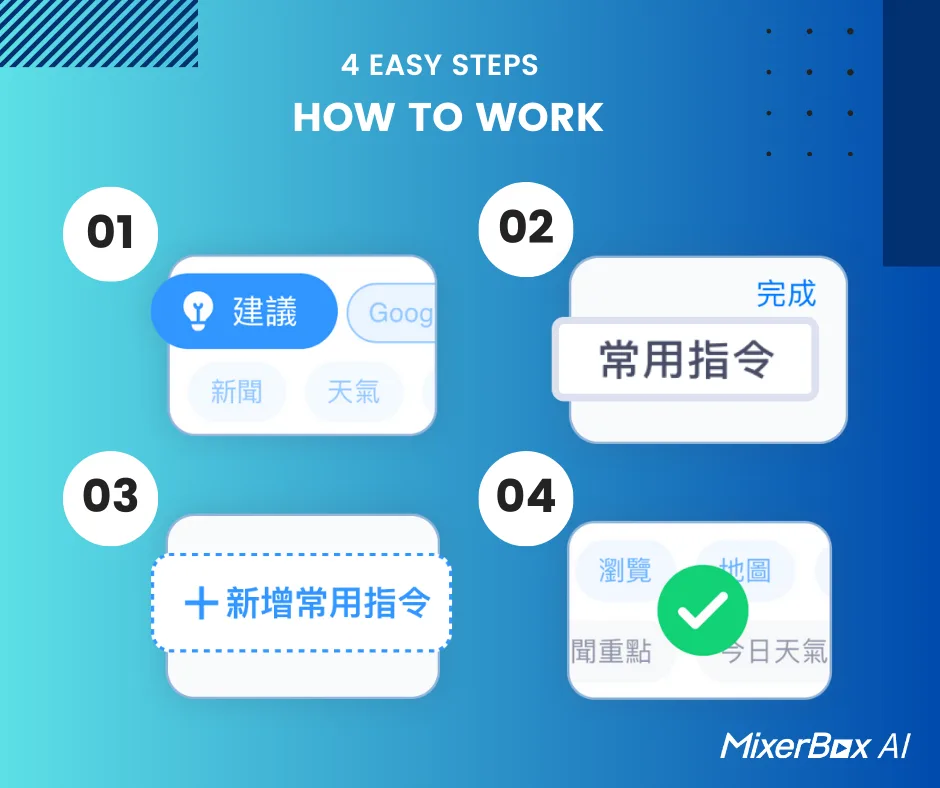
**Do you find yourself using the same few prompts over and over? We hear you! MixerBox AI has added a “Frequently Used Commands” section. Follow the 4 steps below to save the prompts you use most, and they’ll appear at the bottom of your personal MixerBox AI chat screen, ready for you to use every day!Step 1. Tap the “Suggestions” button at the bottom of the MixerBox AI chat screen
Step 2. Tap the “Frequently Used Commands” button in the top right
Step 3. Tap “Add Frequently Used Command” and enter your custom prompt
Step 4. Go back to the MixerBox AI chat screen and check that your custom prompt now appears in the default command bar at the bottom
- **Get NT$1,200 in value right now! Use ChatGPT’s paid features for free! A limited-time event during MixerBox’s National Taiwan University campus recruiting
**Last week, the MixerBox team also took part in campus recruiting at National Taiwan University and launched a special event for “new job seekers.” Just share the MixerBox Careers Facebook page post and tag a friend to get 4 months of MixerBox AI Plus — worth NT$1,200 and equivalent to the features of ChatGPT’s paid plan! The event runs through the end of March, so click here to join now!

MixerBox AI keeps growing and evolving, and our development team will keep building more and better features. We sincerely hope you’ll try out this update (click here to try it), and we’d be very grateful if you could take one minute to share your feedback with us.
Thank you!
The MixerBox AI Team
👉 Try MixerBox AI: mixerbox.ai
👉 Want more of the latest MixerBox AI news? Follow the MixerBox Facebook page!
👉👉 More popular articles:
4 Super-Useful AI Plugins That Dramatically Speed Up Your Workflow
The 5 Big Opportunities of the AI Era — Are You Seizing Them?