
Easily Interact with Podcast Listeners
The following methods can help you interact with your audience in the MixerBox Player. We recommend interactions to be two-way to increase listener loyalty to the show.In Apply for a MixerBox admin account and claim your podcast, you can apply for a MixerBox admin account and claim your Podcast show. This will allow you to post show updates and receive notifications when listeners like or comment on your episode.
▮ Podcast Episode Comments Feature: Establish a two-way interaction with listeners
- When listeners leave a comment or press like, you will be notified.
- Through the episode comment section, you can view user feedback and understand their preferences.
- By liking your listener’s comments, you will seem less distant.
- Actively reply to comments to promote two-way communication and gain listener loyalty
▮ Update Your Feed with Photos & Interesting Topics
- When a new episode is updated, encourage your fans to listen by posting to your feed.
- Share updates about your creation process or interesting aspects from your daily life.
- Invite listeners to exchange opinions and ideas with you in a post.
- Encourage listeners to leave comments on your post.
- When listeners leave a comment or press like on your post, you will be notified.
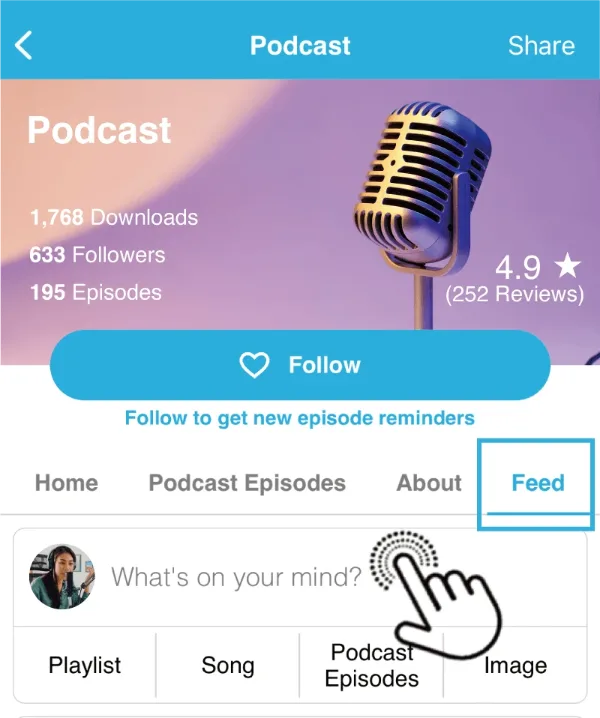
▮ Podcast Show Rating
Encourage listeners to leave a five-star rating and review.
▮ Podcast Epsiode Sharing Feature
Encourage fans to share your Podcast episode link and to recommend your show to friends.
▮ New Episode Notification
When a new Podcast episode is released, your followers will receive a notification from the app.
Here are some example cases to help you better understand how these features work.